Success Stories
13 Mar 2026
Don't just take our word for it - see how SchoolTray powers the digital presence and daily operations of our partner schools. From streamlining parent communication to managing school shops, SchoolTray is the engine behind these successful portals.
Handsworth Primary School
High-Impact Communication for a Busy Primary School

Handsworth Primary uses SchoolTray to maintain a vibrant, up-to-date online hub for their pupils and parents. By utilizing modular class sites and integrated messaging, they ensure that their community is always connected.
- Key Features: Integrated school calendar, dynamic class pages, and Ofsted-compliant statutory information.
- The Result: A professional, easy-to-navigate website that showcases the school's values and student achievements.
Visit handsworthprimary.org.uk »
École Jacques Prévert
A Multilingual Solution for a Multicultural Community
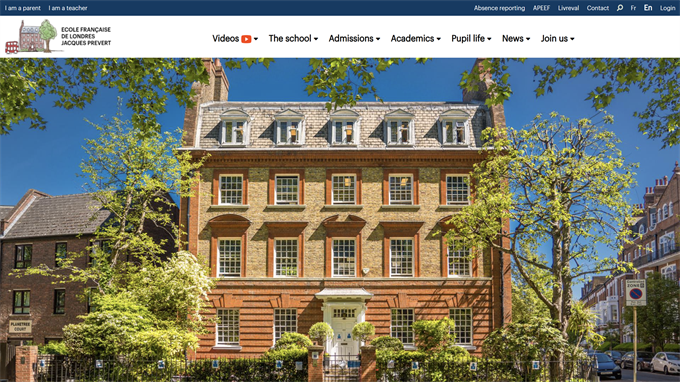
As a prominent French school in London, École Jacques Prévert required a sophisticated, bilingual platform. SchoolTray's unique multilingual module allows them to serve their diverse community in both English and French seamlessly.
- Key Features: Instant language switching, secure parent portal, and integrated payment systems.
- The Result: A truly inclusive digital environment where language is no barrier to parent engagement or administrative efficiency.
Visit ecoleprevert.org.uk »
Why These Schools Chose SchoolTray
- Reliability: 99.9% uptime ensuring the school is always "open" online for its community.
- Ease of Use: Staff can update news, galleries, and reports without needing technical skills.
- Dedicated Support: Our team works closely with each school to ensure the portal evolves with their specific requirements.
Ready to start your own success story? Book a Free Demo today.